G-LiHT#
This notebook illustrates search, directly loading DEMs, and downloading DEMs and LPCs for local processing
Dataset |
Alias |
Type |
Start |
End |
Extent |
Source |
|---|---|---|---|---|---|---|
NASA G-LiHT |
gliht |
LiDAR |
2011-07-28 |
2020-03-12 |
US Territories |
import coincident
import geopandas as gpd
from shapely.geometry import box
import matplotlib.pyplot as plt
# %config InlineBackend.figure_format = 'retina'
/home/docs/checkouts/readthedocs.org/user_builds/coincident/checkouts/v0.5/src/coincident/io/download.py:27: TqdmExperimentalWarning: Using `tqdm.autonotebook.tqdm` in notebook mode. Use `tqdm.tqdm` instead to force console mode (e.g. in jupyter console)
  from tqdm.autonotebook import tqdm
Search#
We’ll search for data in Maryland in July 2017
aoi = gpd.read_file(
    "https://raw.githubusercontent.com/unitedstates/districts/refs/heads/gh-pages/states/MD/shape.geojson"
)
aoi = aoi.simplify(0.01)
m = aoi.explore(color="black")

gf = coincident.search.search(
    dataset="gliht",
    intersects=aoi,
    datetime="2017-07",
)

print(f"Found {len(gf)} G-LiHT Items")
print(f"G-LiHT collections: {gf.collection.unique()}")
gf.explore(m=m, color="magenta")
Found 61 G-LiHT Items
G-LiHT collections: ['GLCHMT_001' 'GLDTMT_001' 'GLDSMT_001' 'GLLIDARPC_001']
Get Data#
NASA G-LiHT has many different provided gridded datasets. The following collections below are the current datasets supported by coincident.
Collection |
Description |
|---|---|
GLORTHO_001 |
orthorectified high-resolution aerial photography |
GLCHMT_001 |
maximum canopy height and canopy variability information |
GLDSMT_001 |
Digital Surface Model, Mean, Aspect, Rugosity, and Slope |
GLDTMT_001 |
bare earth elevation, aspect and slope on the EGM96 Geoid |
GLLIDARPC_001 |
LiDAR Point Cloud data product (LAS format) |
Note
Not all G-LiHT flights will contain every single product listed. For example, a flight may have ‘dsm’ data but not ‘ortho’ data.
# Subset a particular scene
collection = "GLDTMT_001"
gf_gliht = gf.query(f'collection == "{collection}"')
gf_gliht.id
10    GLDTMT_SERC_CalTarps_31July2017_am_l9s0_DTM
11    GLDTMT_SERC_CalTarps_31July2017_am_l8s0_DTM
12    GLDTMT_SERC_CalTarps_31July2017_am_l6s0_DTM
13    GLDTMT_SERC_CalTarps_31July2017_am_l2s0_DTM
14    GLDTMT_SERC_CalTarps_31July2017_am_l7s0_DTM
15    GLDTMT_SERC_CalTarps_31July2017_am_l3s0_DTM
16    GLDTMT_SERC_CalTarps_31July2017_am_l1s0_DTM
17    GLDTMT_SERC_CalTarps_31July2017_am_l5s0_DTM
18    GLDTMT_SERC_CalTarps_31July2017_am_l4s0_DTM
19    GLDTMT_SERC_CalTarps_31July2017_am_l0s0_DTM
41        GLDTMT_SERC_ForestGEO_31July2017_am_DTM
Name: id, dtype: object
# Just use the first one
gs_item = gf_gliht.iloc[0]
c = gs_item.geometry.centroid
mini_aoi = gpd.GeoDataFrame(
    geometry=[box(c.x - 0.0045, c.y - 0.0045, c.x + 0.0045, c.y + 0.0045)],
    crs="EPSG:4326",
)
m = gf_gliht.explore(column="id")
mini_aoi.explore(m=m, color="red", style_kwds={"fill": False, "weight": 3})
Stream#
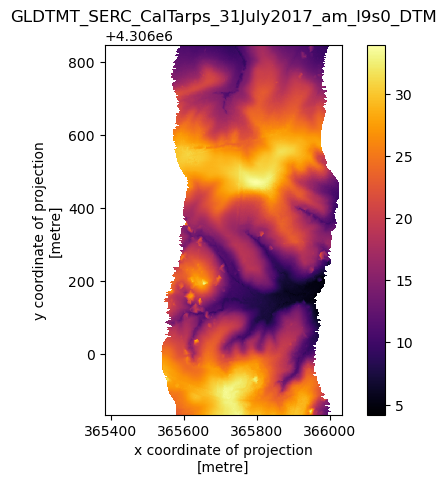
First we’ll show how to stream a subset of a gridded DSM directly into Xarray
Important
Unlike the G-LiHT search, you will need NASA Earthdata credentials (aka EarthData Login (EDL)) to read in and download the gridded datasets from G-LiHT. This requires creating an EDL Token and making sure you’ve set the environment variable EARTHDATA_TOKEN=xxxxx
%%time

da = coincident.io.xarray.load_gliht(
    item=gs_item,
    aoi=mini_aoi,
)
da
CPU times: user 19.6 ms, sys: 9.35 ms, total: 28.9 ms
Wall time: 4.38 s
<xarray.DataArray (time: 1, y: 1013, x: 650)> Size: 3MB
[658450 values with dtype=float32]
Coordinates:
    time         object 8B 2017-07-31T04:00:00+00:00
  * y            (y) float64 8kB 4.307e+06 4.307e+06 ... 4.306e+06 4.306e+06
  * x            (x) float64 5kB 3.654e+05 3.654e+05 ... 3.66e+05 3.66e+05
    spatial_ref  int64 8B 0
Attributes:
    TIFFTAG_XRESOLUTION:  1
    TIFFTAG_YRESOLUTION:  1
    AREA_OR_POINT:        Area
    scale_factor:         1.0
add_offset: 0.0coincident.plot.plot_dem(da)
plt.title(gs_item.id);
Download#
Download multiple STAC Item Assets#
This will put STAC metadata, extended metadata, a browse/thumbnail image, and a TIF in a specified folder
# back to a GeoDataFrame from a Series
gfi = gpd.GeoDataFrame([gs_item])

# And to a Pystac Item
items = coincident.search.to_pystac_items(gfi)
items[0]
# Download the item assets (browse, metadata, thumbnail)
local_item = await coincident.io.download.download_item(
    items[0],
    path="/tmp/gliht/",
)
/home/docs/checkouts/readthedocs.org/user_builds/coincident/checkouts/v0.5/.pixi/envs/docs/lib/python3.14/site-packages/stac_asset/http_client.py:179: UserWarning: the actual content type does not match the expected: actual=application/echo10+xml, expected=application/xml
  warnings.warn(str(err))
Download a single file#
tif_key = [x for x in gs_item.assets.keys() if x.startswith("001")][0]
href = gs_item.assets[tif_key]["href"]
coincident.io.download.download_files([href], "/tmp/")
['/tmp/GLDTMT_SERC_CalTarps_31July2017_am_l9s0_DTM.tif']